Lab 3: Snake Game — Mutexes, Task Notifications, and Event Groups
Prerequisites
Section titled “Prerequisites”Overview
Section titled “Overview”The application is a Snake game. You are given a starter that draws a moving snake and nothing else. Everything interesting — food, scoring, collision detection, game states, speed scaling, and the synchronization that makes it all safe — is your responsibility to design and implement.
There is no reference implementation for the game logic. You will reason through the requirements, identify the race conditions yourself, and choose how to wire the tasks together.
Learning Objectives
Section titled “Learning Objectives”After completing this lab, you will be able to:
- Explain the difference between a mutex and a binary semaphore, and know when to use each
- Protect a shared data structure so that concurrent reads and writes are safe
- Use task notifications to wake a consumer task exactly when new data is ready
- Use an event group to combine multiple boolean conditions into a single synchronization object
- Design a finite state machine that spans multiple tasks
- Reason about race conditions before writing code, not after
Grading Rubric
Section titled “Grading Rubric”| Step | Description | Points |
|---|---|---|
| 1 | Build and run the starter; document the race conditions that exist in the starter code | 8 |
| 2 | Protect all shared game state with a mutex; justify every acquire/release site | 15 |
| 3 | Food system: random placement avoiding the snake body, disappears when eaten | 12 |
| 4 | Game logic: direction reversal prevention, self-collision and wall-mode choice | 15 |
| 5 | Score and speed scaling: score increments on eat; game tick decreases as score grows | 10 |
| 6 | Use task notifications to trigger rendering only when game state changes | 10 |
| 7 | Use an event group to manage FOOD_EATEN and GAME_OVER events for audio feedback | 5 |
| — | Lab report | 25 |
| — | Total | 100 |
Understanding the Starter Code
Section titled “Understanding the Starter Code”Before writing a single line of code, study the starter carefully. This section explains how everything is built. Read it completely — the questions at the end of this part require you to understand the internals.
Task Architecture
Section titled “Task Architecture”The project uses three FreeRTOS tasks running concurrently:
┌─────────────────────────────────────────────────────────────┐│ FreeRTOS Scheduler │├──────────────────┬──────────────────┬───────────────────────┤│ vInputTask │ vSnakeTask │ vRenderTask ││ (priority 2) │ (priority 2) │ (priority 1) ││ │ │ ││ Reads joystick │ Advances snake │ Draws the grid, ││ and buttons │ position every │ snake, and any ││ every 10 ms │ 150 ms │ overlays every 33 ms ││ │ │ ││ Writes: │ Reads: │ Reads: ││ gameState │ gameState │ snake[], snakeLength ││ (direction, │ (direction, │ gameState (for HUD) ││ isRunning, │ isRunning, │ ││ needsReset) │ needsReset) │ ││ │ Writes: │ ││ │ snake[] │ ││ │ snakeLength │ │└──────────────────┴──────────────────┴───────────────────────┘Notice which tasks write data and which tasks read it. This overlap is the source of the race conditions you will fix in Part 1.
File Structure
Section titled “File Structure”- main.cpp # System init, button/joystick setup, three task definitions
- game.h / game.cpp # Snake state structs, ResetGame(), moveSnake()
- display.h / display.cpp # LCD_Init(), DrawGame(), drawCell()
- app_objects.h # Shared handles declared here: gContext, gSysClk
app_objects.h declares objects that are shared across files. It does not define them — definitions live in .cpp files. This is the extern / define pattern from Lab 2. As you add synchronization primitives (mutex, event group, task handles), declare them here.
game.h / game.cpp owns all snake state: the direction enum, the SnakeGameState struct, the Position array, and the two functions ResetGame() and moveSnake().
display.h / display.cpp owns everything LCD-related. DrawGame() reads the snake array and renders a complete frame. drawCell() is a static helper that maps a grid coordinate to pixel coordinates.
main.cpp wires everything together: clock init, button and joystick setup, task creation, and vTaskStartScheduler(). The three task functions are also defined here.
The Grid System
Section titled “The Grid System”The LCD is 128×128 pixels. The game uses an 8×8 pixel cell size, giving a 16×16 grid:
Grid: 16 columns × 16 rows = 256 cellsCell: 8×8 pixels
Cell (gx, gy) → pixel top-left at (gx × 8, gy × 8)             → pixel bottom-right at (gx × 8 + 7, gy × 8 + 7)
drawCell() in display.cpp performs this mapping and fills the cell with a solid color.
Snake Representation
Section titled “Snake Representation”The snake is stored as an array of grid positions:
Position snake[MAX_LEN]; // array of {x, y} pairsuint8_t snakeLength; // how many entries are activesnake[0]is the head — drawn in green.snake[1]throughsnake[snakeLength - 1]are body segments — drawn in yellow.- Positions beyond
snakeLength - 1exist in memory but are ignored.
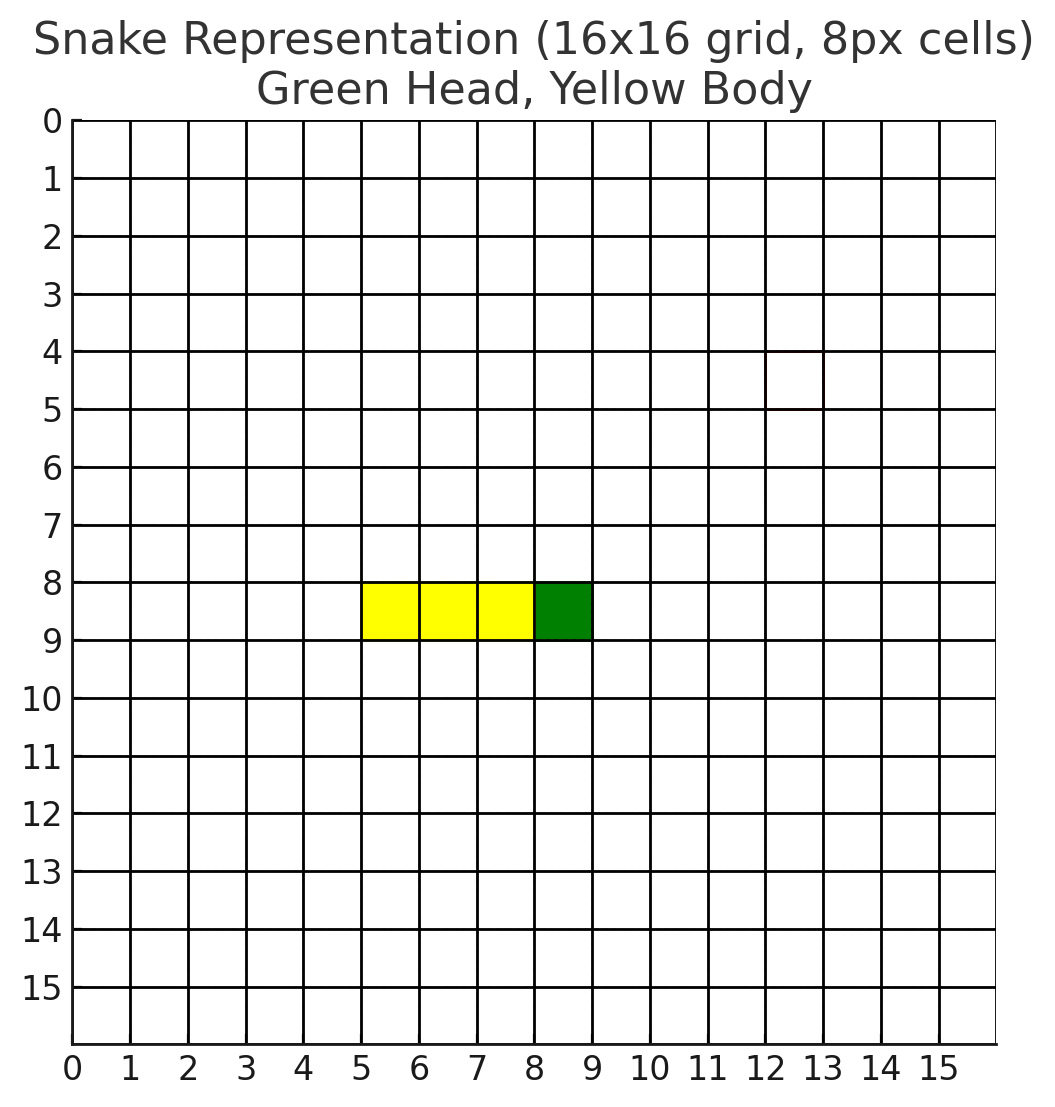
Snake Grid — 16×16 cells, each 8×8 pixels
Movement Logic
Section titled “Movement Logic”moveSnake() runs every game tick. It does two things in order:
Step 1 — Shift the body. Every segment copies the position of the segment ahead of it. The tail (last segment) is overwritten:
for (uint8_t i = snakeLength; i > 0; i--) { snake[i] = snake[i - 1]; // segment i follows segment i-1}// After the loop: snake[0] still holds the OLD head position,// and every other segment has moved one step forward.Step 2 — Move the head. Update snake[0] based on currentDirection. The current code wraps around the edges — reaching the right wall brings the snake out the left side:
case RIGHT: snake[0].x = (snake[0].x == GRID_SIZE - 1) ? 0 : snake[0].x + 1; break;How growth works (you will implement this): if you skip removing the tail — that is, if you do not overwrite snake[snakeLength - 1] — and instead increment snakeLength, the snake becomes one segment longer. The body-shift loop already copies into snake[snakeLength], so the tail slot is ready; you just need to keep it.
Current Limitations
Section titled “Current Limitations”The starter is deliberately incomplete. You will add everything listed below:
| Missing feature | Where to add it |
|---|---|
| Mutex protection for shared game state | app_objects.h, main.cpp, game.cpp |
| Food spawning and detection | game.h / game.cpp |
| Snake growth when eating | game.cpp inside moveSnake() or caller |
| Direction reversal prevention | vInputTask in main.cpp |
| Self-collision detection | game.cpp after moving the head |
| Score counter and display | game.h / game.cpp, display.cpp |
| Speed scaling | vSnakeTask in main.cpp |
| Game over state and screen | game.h, display.cpp, vSnakeTask |
| Task notification (render on demand) | main.cpp |
| Event group for audio events | main.cpp, app_objects.h, new buzzer.cpp |
Part 0 — Find the Bugs
Section titled “Part 0 — Find the Bugs”Before fixing anything, you must identify what is broken.
Open each file and answer:
-
vSnakeTaskwrites tosnake[]andsnakeLength.vRenderTaskreads them at the same time. Is there any protection? What does the ARM Cortex-M4 guarantee about multi-word struct accesses across tasks? -
vSnakeTaskreadsgameState.currentDirectionwhilevInputTaskwrites it. Is avolatiledeclaration enough to make this safe? Why or why not? -
vRenderTaskwakes up every 33 ms regardless of whether anything changed. How many unnecessary redraws per second does this cause when the game is paused?
Part 1 — Mutex: Protecting Shared State
Section titled “Part 1 — Mutex: Protecting Shared State”Read the guide first
Section titled “Read the guide first”After reading, you should be able to answer:
- What property does a mutex have that a binary semaphore does not?
- Why is priority inheritance relevant when a high-priority task waits for a low-priority task to release a mutex?
- Can you call
xSemaphoreTake()on a mutex from within an ISR? Why not?
What needs protection
Section titled “What needs protection”You need one mutex for game state — not necessarily one per variable. The protected region must be as short as possible: take the mutex, do the minimum, give it back.
Think through which data structures are read by one task and written by another:
| Data | Written by | Read by |
|---|---|---|
snake[], snakeLength | vSnakeTask | vRenderTask |
gameState.currentDirection | vInputTask | vSnakeTask |
| food position (you will add this) | vSnakeTask | vRenderTask |
| score (you will add this) | vSnakeTask | vRenderTask |
You must decide: one mutex for all of this, or separate mutexes for separate resources? There is no single correct answer — document your choice and justify it.
Implementation checklist
Section titled “Implementation checklist”- Define and create the mutex (or mutexes) before starting the scheduler.
- Identify every code site where shared data is accessed.
- Wrap each site with
Take/Give. Keep the critical section as short as possible. - Verify: if you add
vTaskDelay(pdMS_TO_TICKS(500))inside the critical section, the game should freeze. Remove that test afterwards.
Report Question 1: Draw the task timeline for a single frame. Show which task holds the mutex and for how long. What is the worst-case latency imposed on vRenderTask by waiting for the mutex?
Part 2 — Game Logic
Section titled “Part 2 — Game Logic”This is the largest design section. The starter provides the grid, the position array, and moveSnake(). Everything below is yours to design.
2.1 Direction reversal prevention
Section titled “2.1 Direction reversal prevention”The current code lets the player reverse direction instantly. If the snake is moving right and the player pushes left, the head moves into the second body segment — an instant self-collision.
Fix this inside the input handling code. The rule: if the requested direction is the exact opposite of the current direction, ignore the request. Implement this with a simple comparison, not a lookup table.
2.2 Food system
Section titled “2.2 Food system”Add a Position gFood variable that represents the current fruit position. You need:
Spawning: Place food at a random grid position that does not overlap any snake segment. The starter does not include a random number generator — use rand() from <stdlib.h> seeded with a timer value, or implement a simple LCG.
Detection: After moveSnake() advances the head, check whether the new head position matches gFood. If it does, food was eaten.
Growth: When food is eaten, do not remove the tail segment. This is already how a snake grows — if you shift the body forward but keep the tail, the snake becomes one segment longer. Think carefully about when to increment snakeLength.
Re-spawn: After eating, spawn new food at another valid position.
Think about ownership: which task spawns food? Which task checks for eating? How do you ensure food position is not read while it is being written?
2.3 Collision detection
Section titled “2.3 Collision detection”Implement self-collision: after moving the head, compare the head’s position against every body segment from index 1 to snakeLength - 1. If the head matches any body segment, the game ends.
You choose whether walls kill the player or wrap around. Document your choice in the report. If you implement wall collision, the existing wrap-around code in moveSnake() must be replaced.
2.4 Score and speed scaling
Section titled “2.4 Score and speed scaling”Add a uint16_t gScore variable. Increment it each time food is eaten. The score must be displayed on screen.
The game tick period controls snake speed. Start at 150 ms (as in the starter). Each time food is eaten, reduce the period by a fixed amount (for example, 5 ms). Set a minimum period floor (for example, 60 ms) so the game does not become unplayable.
The period controls the vTaskDelay inside vSnakeTask. You need to recalculate this dynamically after each food event.
2.5 Game over state
Section titled “2.5 Game over state”When a collision is detected, the game should enter a GAME_OVER state. The display should show a game over message with the final score. Pressing S2 should restart the game.
This requires a state machine. At minimum:
PLAYING → GAME_OVER (on collision)GAME_OVER → PLAYING (on S2 press, via ResetGame)PAUSED (S1 toggles; only valid during PLAYING)Add this state to SnakeGameState. The state must be readable by both vSnakeTask and vRenderTask.
Part 3 — Task Notifications: Event-Driven Rendering
Section titled “Part 3 — Task Notifications: Event-Driven Rendering”What task notifications are
Section titled “What task notifications are”A task notification is a lightweight signal sent directly to a specific task. Unlike a semaphore, it requires no kernel object to be created — every FreeRTOS task already has a notification value built in.
The two functions you need:
// Send a notification to a task (from another task or ISR)xTaskNotifyGive(TaskHandle_t xTaskToNotify);
// Wait for a notification (blocks until one arrives)ulTaskNotifyTake(pdTRUE, TickType_t xTicksToWait);
ulTaskNotifyTake with pdTRUE clears the notification count after returning, so the next call will block until the next notification arrives.
The problem
Section titled “The problem”vRenderTask currently wakes every 33 ms regardless of whether anything changed. When the game is paused, this produces ~30 identical frames per second for no reason. When the game is running, rendering may lag one full 33 ms tick behind the actual state change.
The solution
Section titled “The solution”Make vSnakeTask notify vRenderTask every time it produces a new game state. vRenderTask blocks until notified rather than polling on a fixed timer.
To do this, vSnakeTask needs the task handle for vRenderTask. One clean way:
// main.cpp — declare before task creationstatic TaskHandle_t xRenderHandle = NULL;
// Pass it to vSnakeTask via pvParameters, or make it a global.// Then inside vSnakeTask, after each state update:if (xRenderHandle != NULL) {    xTaskNotifyGive(xRenderHandle);}
Inside vRenderTask, replace vTaskDelayUntil with:
ulTaskNotifyTake(pdTRUE, portMAX_DELAY);// draw the current stateReport Question 2: Compare the old polling approach (vTaskDelayUntil every 33 ms) with the task-notification approach. When does the notification approach save CPU time? When might polling be preferable?
Part 4 — Event Groups: Coordinating Game Events
Section titled “Part 4 — Event Groups: Coordinating Game Events”What event groups are
Section titled “What event groups are”An event group holds a set of bits. Any task can set or clear any bit. Any task can wait for one or more bits to be set, optionally clearing them after the wait.
The key functions:
// CreateEventGroupHandle_t xEventGroupCreate(void);
// Set bits (from a task; use xEventGroupSetBitsFromISR from an ISR)xEventGroupSetBits(EventGroupHandle_t xEventGroup, EventBits_t uxBitsToSet);
// Wait for any or all of the specified bitsEventBits_t xEventGroupWaitBits( EventGroupHandle_t xEventGroup, EventBits_t uxBitsToWaitFor, BaseType_t xClearOnExit, // pdTRUE to clear matched bits after return BaseType_t xWaitForAllBits, // pdFALSE = any bit, pdTRUE = all bits TickType_t xTicksToWait);Applying event groups to audio feedback
Section titled “Applying event groups to audio feedback”The buzzer task from Lab 1 used a queue to receive (frequency, duration) pairs. This lab uses a different pattern: an event group that signals which kind of event occurred, and the buzzer task decides the tone.
Define two bits:
#define EVT_FOOD_EATEN (1 << 0)#define EVT_GAME_OVER (1 << 1)When vSnakeTask detects food eaten, it sets EVT_FOOD_EATEN. When it detects a collision, it sets EVT_GAME_OVER. The buzzer task waits for either bit and plays a different tone for each:
void vBuzzerTask(void *pvParameters) {    for (;;) {        EventBits_t bits = xEventGroupWaitBits(            xGameEvents,            EVT_FOOD_EATEN | EVT_GAME_OVER,            pdTRUE,       // clear the bits after waking            pdFALSE,      // wake on any bit (not all)            portMAX_DELAY        );
        if (bits & EVT_FOOD_EATEN) {            // short, high-pitched beep        }        if (bits & EVT_GAME_OVER) {            // long, low-pitched tone        }    }}
Create xGameEvents before the scheduler starts. Declare it in app_objects.h and define it in main.cpp.
Report Question 3: Could you have implemented this with two separate binary semaphores instead of one event group? What would be different? Why is the event group cleaner when you have more than two events?
Final Project Structure
Section titled “Final Project Structure”By the end of the lab your project should look like this:
- main.cpp # System init, task creation, event group creation
- app_objects.h # gContext, gSysClk, xMutexGame, xGameEvents, task handles
- game.h / game.cpp # SnakeGameState, food, score, ResetGame, moveSnake, collision
- display.h / display.cpp # LCD_Init, DrawGame, DrawGameOver
- buzzer.h / buzzer.cpp # vBuzzerTask, Buzzer_Init
- FreeRTOS.h / FreeRTOSConfig.h
- startup_ccs.c
DirectoryFreeRTOS/
- …
main.cpp should look like system glue: hardware init, shared object creation, task creation, scheduler start. All game logic, all drawing logic, and all buzzer logic live in their own files.
Integration Checklist
Section titled “Integration Checklist”Before demonstrating to a TA, verify each of the following:
- Snake moves with joystick; direction reversal is prevented
- Food appears on screen and never spawns on the snake body
- Eating food grows the snake, increments the score, and speeds up the game
- Self-collision triggers the game over state
- Game over screen shows final score; S2 restarts
- Pause (S1) works during PLAYING; does nothing during GAME_OVER
- Eating food plays a distinct short beep
- Game over plays a distinct longer tone
- No visual corruption under stress (rapidly press buttons and tilt joystick)
- All LCD access is guarded by the mutex; no
vTaskDelayinside the critical section
Lab Report (25 points)
Section titled “Lab Report (25 points)”The report must be written in clear, professional English. Do not paste your entire source code into the report — include only the relevant snippets when illustrating a point.
Required sections
Section titled “Required sections”1. Introduction (2 pts)
Describe the purpose of the lab and summarize what you built.
2. System Architecture (5 pts)
Include a diagram showing all tasks, their priorities, the shared objects (mutex, event group, notification path), and the data each task reads and writes. Explain your priority assignment.
3. Analysis Questions (13 pts)
-
Q1 (4 pts): Answer the three questions from Part 0. For Q1 and Q2, support your answer with a concrete example of what could go wrong without protection.
-
Q2 (3 pts): Compare polling (vTaskDelayUntil every 33 ms) against task notifications for rendering. Give a scenario where each approach is better and explain why.
-
Q3 (3 pts): Explain your mutex design: how many mutexes did you use, what region does each protect, and what is the maximum time any task holds the mutex? What would happen to the game if a task held the mutex for 200 ms?
-
Q4 (3 pts): Describe a scenario where both
EVT_FOOD_EATENandEVT_GAME_OVERare set beforevBuzzerTaskwakes up. What doesxEventGroupWaitBitsreturn in that case? Does your buzzer task handle it correctly?
4. Design Decisions (3 pts)
Explain three design choices that were not dictated by the lab instructions. For each: what did you choose, what was the alternative, and why did you choose the way you did?
5. Conclusion (2 pts)
What was the hardest part of this lab? What would break first if the system had twice as many tasks at the same priorities?
Submitting Source Code
Section titled “Submitting Source Code”- Name your project
ece3849_lab3_<username>. - Right-click the project in CCS →
Export...→General→Archive File. - Name the output file
ece3849_lab3_<username>.zip. - Upload the
.zipand your lab report PDF to Canvas.